


百度OCR接口的调用
今天与大家分享的是利用百度OCR接口进行文字识别。
首先呢,先去百度AI中心申请应用,如图
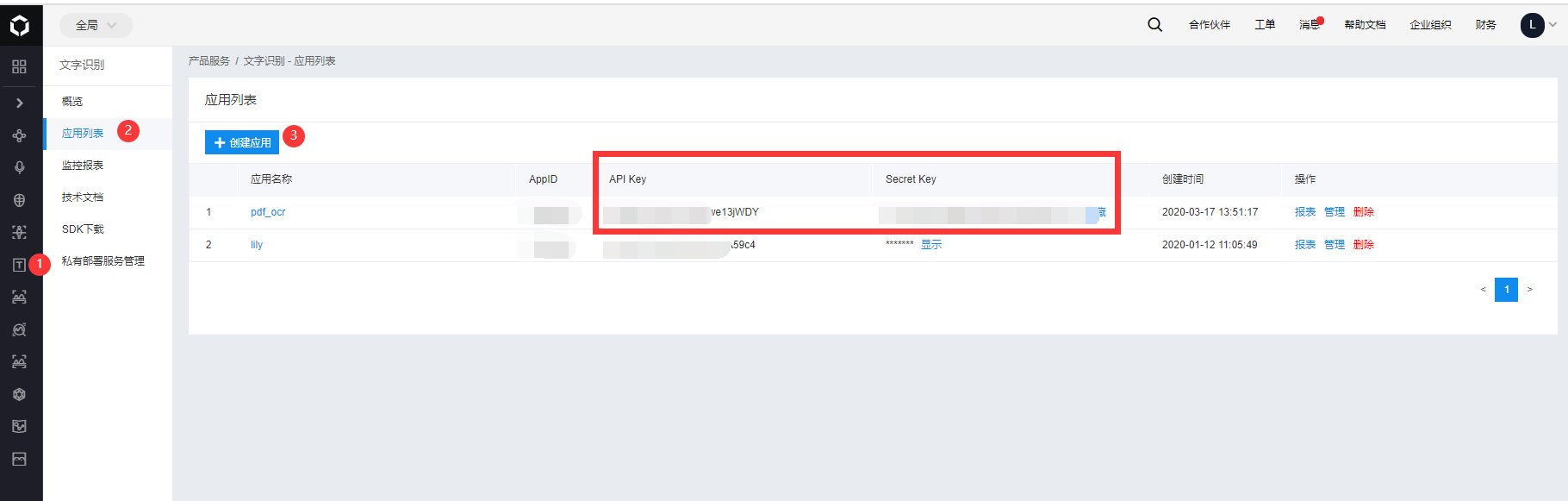
将API Key和Secret Key分别填到代码的相应位置处,替换完成后是不带"[]"的哦。
#!/usr/bin/env python
# -*- coding:utf-8 -*-
# Author:李绍丰 河北工业大学-能源与环境工程学院
# times:2020.3.17

# ****************************************************************
# 程序功能:调用百度文字识别
# 模块划分:无
# ****************************************************************

import requests
import base64


class baidu_ocr():
    def __init__(self):
        self.request_url = "https://aip.baidubce.com/rest/2.0/ocr/v1/general_basic"
        self.content = []
        self.get_token()

    def get_token(self):
        '''把获取的AK和SK替换下面的[AK],[SK]'''
        host = 'https://aip.baidubce.com/oauth/2.0/token?grant_type=client_credentials&client_id=[AK]&client_secret=[SK]'
        response = requests.get(host)
        if response:
            self.token = response.json()['access_token']
        else:
            if response.json()['error_description'] == 'unknown client id':
                raise ValueError("API Key不正确")
            else:
                raise ValueError("Secret Key不正确")

    def localpic(self,path):
        f = open(path, 'rb')
        self.img = base64.b64encode(f.read())
        self.ocr(self.img)

    def ocr(self, image=None, url=None):
        if image:
            params = {"image":image}
        else:
            params = {"url": url}
        request_url = self.request_url + "?access_token=" + self.token
        headers = {'content-type': 'application/x-www-form-urlencoded'}
        response = requests.post(request_url, data=params, headers=headers)
        if response:
            try:
                self.content.append(x['words'] for x in response.json()['words_result'])
                return response.json()['words_result']
            except:
                print(url)

    def __help__(self):
        print("""aa = baidu_ocr()\n aa.ocr(url='http')  # 网址的用法\n aa.localpic('path.png')     # 本地图片的用法\n print(aa.content)""")
上一篇
Nextcloud手工安装记录